A preview of parametric color scales
Here is a small preview of an upcoming project. For a while now, handling colors in design projects has been bugging me.
Projects usually require color scales with many different hues, and with each made up of 8 to 12 colors from light to dark, designers easily end up having to define up to a hundred different colors. Historically, designers have been “eyeballing” it since tweaking RGB or HSL values doesn’t guarantee uniform saturation, lightness (contrast) or even hue. For example, one might think shifting the hue of a color in HSL would result in a color that has the same saturation and luminance as before. How great! Simply take an orange color scale, turn every hue to green, and get a new green color scale, job well done. It turns out, however, one does not simply shift the hue to green. The problem is that HSL is not perceptually uniform, it is mathematically consistent and easy to work with, but different hues result in different perceived chroma and luminance to the human eye. For this reason, designers have to “eyeball” it and adjust the colors individually, a hundred time in the worst case. As one of the foundations of design systems and applications, it is important to get the colors right, so that they can be used as a robust basis for any components, controls, or interfaces that are built on top of them.
But not only that, over the years color systems have received additional responsibilities from accessibility requirements, to theming and semantic design tokens. Because of that, there is a need for more scalable tooling to design – and maintain – color systems.
Apart from tooling, there have been a couple of interesting developments in the color space area, mainly Björn Ottosson’s Oklab, which I find particularly interesting. Recently game engines and browsers have released support for oklab and oklch, so a large segment of users have access to them natively now (caniuse has oklch support at around 93%). The main benefit of these new color spaces is that easy-to-use parameters and perceptual uniformity are no longer at odds. Shifting a hue will result in a new color with almost exactly the same chroma and luminance, which makes creating color scales at scale feasible.
Currently my workflow starts with the design of a color scale in Figma by hand, then I export the hex values and switch to EightShapes Contrast Grid. The contrast grid is a very useful tool to see how uniform the contrast values are along the scale and if there are any adjustments necessary. This process then repeats a few times until I have a scale that I like. Now, as mentioned before, this process has to be repeated for every hue that I need.
The contrast grid is also incredibly useful for finding which colors can be paired together for foreground and background, while meeting various accessibility standards, like WCAG 2.1 double and triple A.
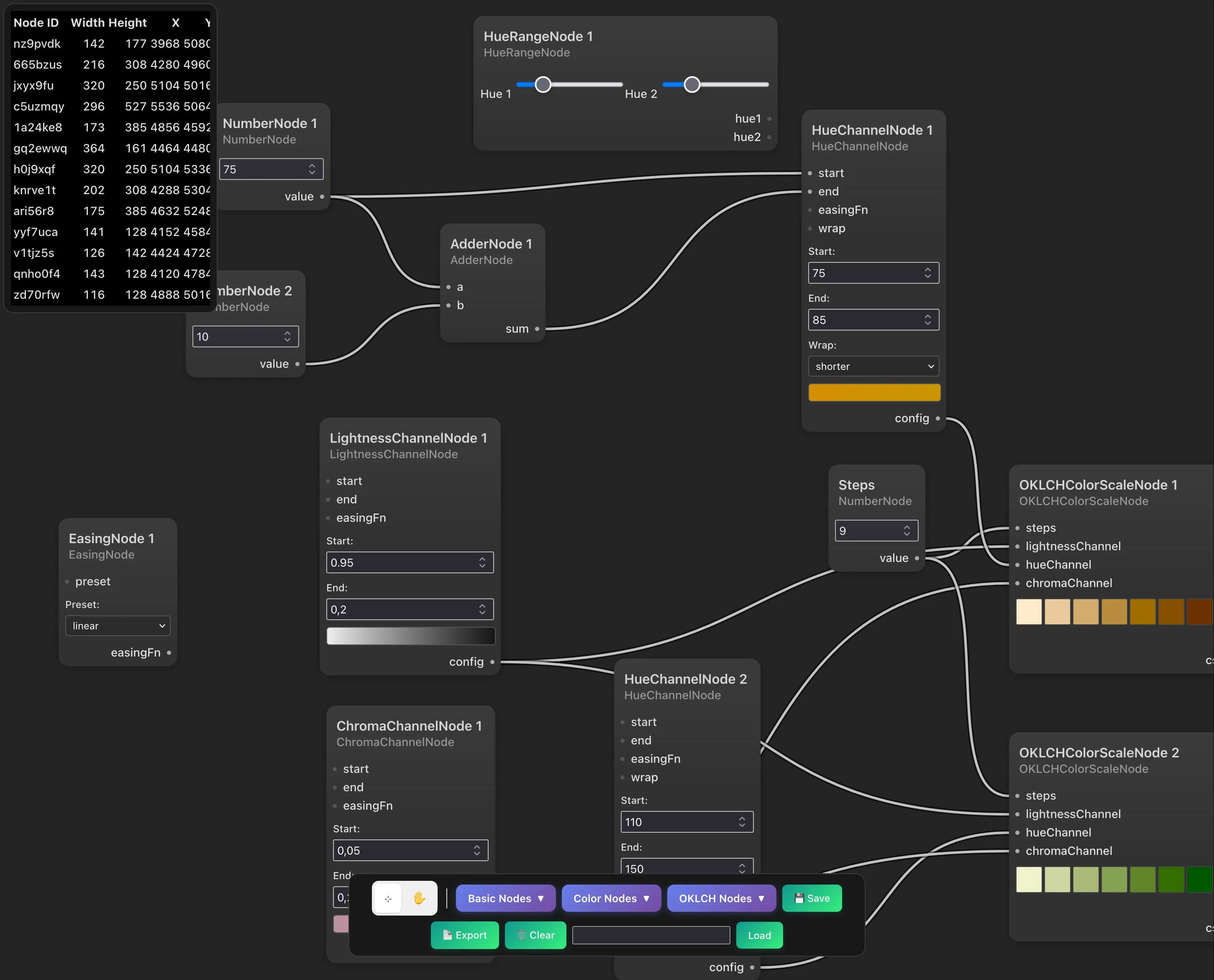
Right now I’m developing a prototype node-based interface that allows to define parameters and their relationships more clearly than via traditional interfaces. Channel nodes for lightness, chroma, and hue take in start and end values and easing functions. This allows for complex transformations, similar to colorbox.io. By plugging the same lightness and chroma channels into multiple scale nodes, we can quickly experiment with different values and create multiple scales with the same contrast properties.
Going further, I can imagine implementing nodes to test the output for accessibility, whether they’re going out of gamut, or to generate exports into different formats. On the topic of exports, exploring how these raw colors could be used to generate design tokens would be another direction to extend it.